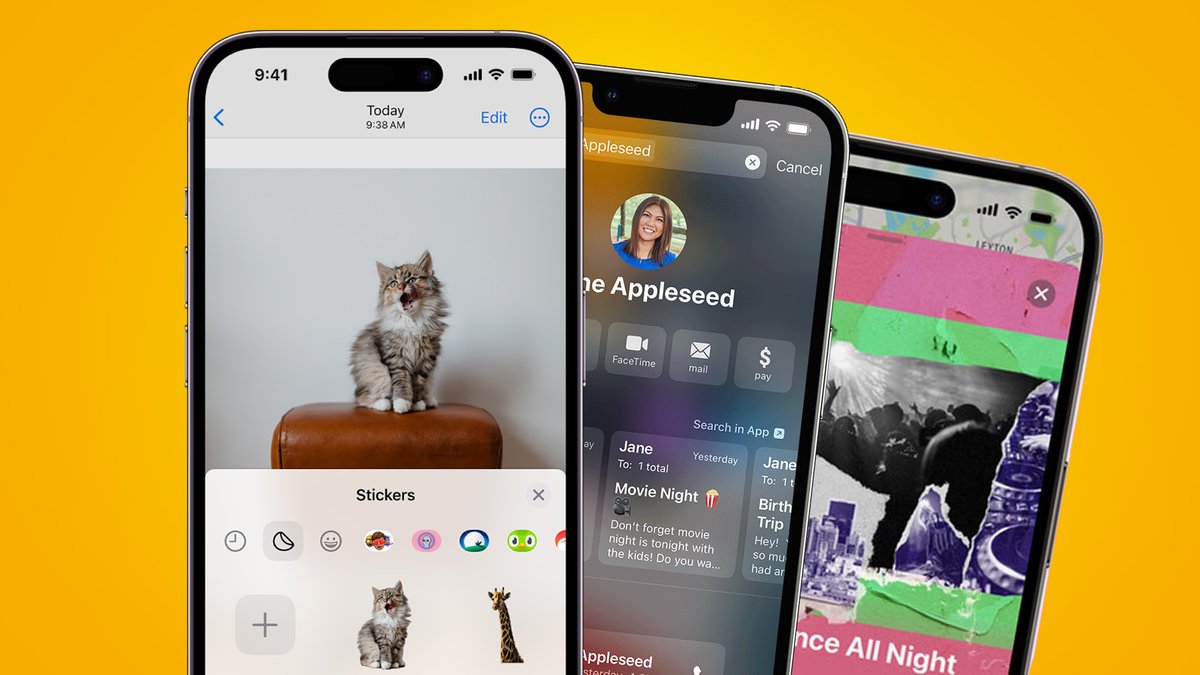
For years, Apple has built its reputation on a formidable commitment to user privacy and security. With iOS 18, that commitment isn't just maintained, it's dramatically enhanced, ushering in a new era where your personal data is even more protected, and your device gains unprecedented intelligent capabilities. This isn't just a minor iteration; it's a foundational shift, bringing powerful AI to your fingertips while simultaneously fortifying the digital walls around your most sensitive information.
Whether you're concerned about data breaches, tired of an "all or nothing" approach to app permissions, or simply eager for an iPhone that understands and assists you more intuitively, iOS 18 promises significant upgrades you’ll actually feel in your day-to-day digital life. The operating system, alongside iPadOS 18.0, is now available, and updating your devices — and considering automatic updates — is a straightforward first step toward harnessing these advancements.
At a Glance: iOS 18's Game-Changing Upgrades
- Passwords App: A dedicated, secure vault for all your credentials, automatically flagging weaknesses and breaches.
- Hidden Apps: Move sensitive apps to a locked, biometric-protected folder, keeping your screen private.
- Granular Contact Sharing: Decide exactly which contacts an app can access, no more full-list sharing.
- Enhanced Passkeys: Automatic upgrades make secure, password-less logins even more widespread.
- Apple Intelligence: A personalized AI system designed with privacy as its bedrock, running mostly on-device or via secure Private Cloud Compute.
- Smarter Siri & Writing Tools: AI-powered assistance for writing, image creation, and a Siri that understands your personal context better than ever.
- Activation Lock Expansion: Critical device components are now linked to your Apple ID, deterring theft and unauthorized part replacements.
Your Digital Fortress: iOS 18's Privacy and Security Reinforcements
At the heart of iOS 18 is a renewed emphasis on giving you, the user, more control and transparency over your data and device. These aren't just theoretical protections; they're practical tools designed to simplify security and empower you to manage your digital footprint with greater confidence.
The New Passwords App: Your Digital Vault Just Got Smarter
Remember Apple's Keychain? It's always been there, quietly storing your passwords. Now, in iOS 18, it's stepped into the limelight as a dedicated, standalone Passwords app. This isn't just a convenient list; it's a proactive security tool.
Imagine opening an app that immediately shows you all your stored credentials. Even better, it acts as your personal digital security guard, warning you about:
- Data Breaches: Notifying you if any of your stored passwords have been compromised in known data breaches.
- Weak Passwords: Identifying passwords that are easily guessable.
- Reused Passwords: Highlighting instances where you're using the same password across multiple accounts, a major security risk.
All your existing AutoFill passwords migrate seamlessly into this new app, making the transition effortless. It’s about making robust password management accessible and intuitive, transforming a chore into a seamless security habit.
Taking Back Your Screen: Hiding and Locking Apps
Ever handed your phone to a friend or family member, only to quickly swipe away from an app you'd prefer they not see? iOS 18 addresses this with a feature that offers unprecedented control over app visibility. You can now hide apps by moving them to a dedicated, locked folder.
Think of it as a secret compartment on your home screen. This folder is only accessible via Face ID, Touch ID, or your device passcode. Most apps from the App Store are eligible for this, transforming your home screen into a curated, private space.
A few important nuances to keep in mind:
- Age Restrictions: For users under 13, the ability to lock or hide apps isn't available. For those aged 13-18, the feature is present, but parents maintain visibility of downloaded apps and their usage, striking a balance between autonomy and supervision.
- Notification Control: Beyond hiding the app icon, iOS 18 also allows you to fine-tune app notifications and content display, preventing sensitive information from inadvertently popping up on your lock screen or banners.
This feature is a game-changer for anyone who shares their device occasionally or simply values an extra layer of privacy for specific applications.
Granular Control Over Your Contacts and Data
One of the most significant shifts in iOS 18's privacy approach is the move away from "all or nothing" data sharing. This is particularly evident in Configurable Contact Sharing.
Before, when an app requested access to your contacts, it was often an all-or-nothing proposition. Now, you have granular control. Imagine a work app asking for contacts; you can choose to share only your work-related contacts, keeping your personal contacts private.
Here’s how it works:
- When an app requests contact access, the system prompts you to either block or allow it.
- If you allow, you then get the option for full access or to select specific contacts you wish to share.
- These permissions aren't set in stone. You can update them at any time from your device settings.
This principle extends beyond contacts. A new Data Access Overview feature provides a clear, consolidated view of which apps have access to various data categories, including:
- Location services
- Tracking
- Calendars
- Files and folders
- Health information
- Contacts
Crucially, it shows you the level of access (limited or full) an app has, empowering you to make informed decisions and revoke permissions as needed. This transparency is key to managing your digital privacy effectively.
Stepping Up Authentication: Passkeys and Beyond
Passwords are a necessary evil, but they're prone to phishing, breaches, and human error. Passkeys, Apple's more secure, phishing-resistant alternative, have been around for a while, but iOS 18 makes them even more prevalent.
This update introduces automatic passkey upgrades. Websites and services that support passkeys can now prompt you to transition from your traditional password to a more secure passkey during login or account creation. This uses a new registration API, simplifying the process.
Passkeys leverage public-key cryptography for single-tap login, making them not only more secure but also more convenient. Once created, they're stored securely in your password manager (the new Passwords app), protecting them from common cyber threats. It’s a significant step toward a password-less future, where convenience doesn't come at the expense of security.
A Smarter, Safer Home: Accessory Connections
Your smart home is increasingly integrated with your digital life, and iOS 18 brings important privacy and security updates to the Home app and connected accessories.
- Guest Access for Home App: Sharing control of your smart home with others is now simpler and more secure. The new guest access feature allows you to grant temporary or limited control over specific accessories to household members or visitors, without giving them full administrative access to your entire smart home setup.
- Enhanced Device Pairing with AccessorySetupKit: The
AccessorySetupKitprovides a smoother and more secure device pairing process. It enables single-tap pairing for new accessories, streamlining what can often be a cumbersome setup. Crucially, apps can no longer passively discover devices on your network that haven't been explicitly paired. This prevents unauthorized surveillance of your smart home devices.
You also gain fine-grained control over accessory permissions. You can share individual device permissions with other apps as needed, and revoke all permissions for a device simply by removing it from the accessory menu. This ensures that your smart home devices only share data with the apps you explicitly approve.
Hardware-Level Defense: Activation Lock Enhancements
Apple’s Activation Lock has long been a powerful deterrent against iPhone theft, rendering a stolen device useless to anyone but the original owner. With iOS 18, this protection extends deeper into the hardware itself.
Activation Lock now links key internal parts – such as batteries, cameras, and displays – to the original owner's Apple account. This has a twofold benefit:
- Deters Component Theft: It makes it much harder for thieves to dismantle stolen devices and sell their parts, as these components would be unusable in another device without the original owner's authentication.
- Blocks Unauthorized Repairs: By linking parts to the original owner, it creates a formidable barrier against unauthorized third-party repairs using non-genuine or stolen parts, ensuring the integrity of the device’s components.
While this significantly enhances security, it's worth noting that it may complicate repairs outside Apple's authorized channels. However, the trade-off is a much more secure ecosystem, protecting users from both device theft and potentially unsafe component replacements.
Unlocking Intelligence: The Dawn of Apple Intelligence
Perhaps the most anticipated feature of iOS 18 is Apple Intelligence, Apple's highly personal intelligence system. This isn't just about adding AI; it's about integrating powerful generative models with your personal context to deliver truly useful and relevant intelligence, all while safeguarding your user privacy and security. While expected to launch next month, its foundation is firmly baked into iOS 18.
What is Apple Intelligence? Your Personal AI System
Apple Intelligence is designed to understand you and your world without collecting your personal data for broad model training. It leverages your personal context – the information stored securely on your device, like your messages, photos, calendar events, and files – to provide assistance that is uniquely relevant to you.
Think of it as a highly capable personal assistant that knows your habits, your preferences, and your information, but keeps it all strictly to itself. This contextual understanding is what makes Apple Intelligence so powerful and different from more generic AI systems.
Privacy at AI's Core: How Apple Intelligence Protects You
When it comes to AI, privacy concerns are paramount. Apple has tackled this head-on with a "privacy and security from the ground up" architecture for Apple Intelligence. They've even invited independent security researchers to validate their claims, emphasizing transparency and trust.
The core of this privacy architecture rests on two pillars:
- On-Device Processing: For many tasks, Apple Intelligence performs computations directly on your device. This keeps your data local, provides faster response times, and eliminates the risk of sensitive information being exposed during transit to external servers. This is the default and preferred method.
- Private Cloud Compute (PCC): For more complex requests that exceed the processing power of your device, Apple developed Private Cloud Compute (PCC). This is a groundbreaking approach, extending the privacy and security guarantees of your Apple device to the cloud itself. PCC is an ephemeral (non-persistent) cloud intelligence system, explicitly designed for private AI processing.
Here's how PCC ensures your privacy and security:
- No Persistent Data Storage: Your data is never stored on PCC servers. It's processed and immediately discarded.
- Prevention of Privileged Access: Even Apple employees cannot access your data on PCC.
- Secure Enclave Protection: Encryption keys on PCC servers are protected by a secure enclave, making them incredibly difficult to compromise.
- Secure Boot: The operating system running on PCC servers uses secure boot, ensuring only trusted code can run.
- Trusted Execution Monitor: This system verifies that only cryptographically signed and verified code is running on PCC, preventing unauthorized programs.
- Attestation by User Devices: Your iPhone or iPad actively verifies the configuration and identity of the PCC cluster it connects to, ensuring it's communicating with legitimate, secure Apple infrastructure.
- End-to-End Encryption: Any data sent to PCC is end-to-end encrypted, meaning only your device can decrypt it.
- Data Not Retained or Accessible: Crucially, transmitted data is neither retained nor accessible by Apple.
This multi-layered approach to PCC effectively creates a private, isolated, and verifiable cloud environment, allowing powerful AI computations without sacrificing your personal privacy.
AI That Works For You: Practical Enhancements
Apple Intelligence integrates seamlessly across iOS 18, enhancing everyday tasks and unlocking new creative possibilities.
Writing Tools: Polished Prose, Effortlessly
Imagine having a sophisticated editor built directly into your iPhone. System-wide Writing Tools powered by Apple Intelligence can help you:
- Rewrite: Rephrase sentences to be more concise, formal, or friendly.
- Proofread: Catch grammar and spelling errors, and suggest stylistic improvements.
- Summarize: Condense long emails or documents into key bullet points.
This functionality is automatically integrated into apps that use standard UI frameworks, meaning you’ll find it across Mail, Notes, Pages, and many third-party apps, making it easier than ever to craft succinct and impactful writing. Developers can use aTextView Delegate APIfor custom behaviors within their apps.
Express Yourself: Genmoji and Image Playground
Sometimes, words aren't enough. Apple Intelligence introduces innovative ways to express yourself visually:
- Genmoji: Ever wanted an emoji of a "happy dinosaur wearing a party hat"? Now you can create it. By simply typing a prompt, you can generate custom emojis that perfectly capture your sentiment. These images are generated directly on-device, again prioritizing your privacy.
- Image Playground API: Beyond emojis, the Image Playground API allows you to generate unique images from prompts. Whether you need a whimsical illustration for a message or a creative visual for a project, you can describe it, and Apple Intelligence will create it. Like Genmoji, image generation happens on-device.
For developers, if their apps use standard text systems with inline images, minimal code is required to integrate these creative tools.
A Smarter Siri: Understanding You Better
Siri has always been helpful, but in iOS 18, it gets a significant intelligence boost thanks to Apple Intelligence.
- Enhanced Personal Context: Siri now taps into a semantic index of your personal data – your messages, photos, calendar, and files – to understand your requests with far greater personal context. This means it can answer questions like, "What was the name of that restaurant David recommended last week?" by looking through your messages.
- On-Screen Awareness: Siri can now access and understand on-screen text within apps that use standard text systems. This allows for commands like, "Summarize this article" while you're reading a webpage.
- Spotlight API Integration: A new
Spotlight APIallows Siri to search app-specific data directly. For instance, you could ask Siri to "Find that recipe I saved in MyCookbook app last month."
Apple explicitly guarantees that this personal data used by Siri and Apple Intelligence is encrypted, not stored by Apple, and not accessible to Apple. Independent audits are promised to verify these claims, reinforcing the commitment to privacy.
Taking Action: Updating and Securing Your Device
With iOS 18 and iPadOS 18.0 now available, the immediate next step is to update your devices. Go to Settings > General > Software Update. Beyond manually updating, consider turning on Automatic Updates. This ensures your device always benefits from the latest security patches and feature enhancements without you having to remember.
These upgrades underscore a significant moment for Apple users. From the robust new Passwords app and granular app controls to the deeply integrated and privacy-centric Apple Intelligence, iOS 18 provides a more secure, more personal, and ultimately, a more capable iPhone experience. If you’ve been wondering Is iOS 18 worth it?, the profound enhancements to privacy, security, and the intelligent capabilities of your device make a compelling case for embracing this update.
Your Questions Answered: iOS 18 Security & AI FAQs
Is it safe to use Private Cloud Compute (PCC) for AI tasks?
Yes, Apple has designed PCC with multiple layers of privacy and security protections, including end-to-end encryption, no persistent data storage, and device attestation to ensure your data remains private and inaccessible to Apple.
Can Apple Intelligence see my personal messages or photos?
Apple Intelligence can access your personal context (messages, photos, emails, etc.) but all processing happens on-device or via the highly secure, ephemeral Private Cloud Compute. This data is encrypted, never stored by Apple, and inaccessible to Apple employees.
How do I hide apps in iOS 18?
You can hide apps by moving them to a locked, hidden apps folder accessible only via Face ID, Touch ID, or your device passcode. Specific instructions will be available in the Settings app under privacy or app management sections once the feature is fully rolled out.
Will Activation Lock prevent me from repairing my device at an unauthorized repair shop?
Activation Lock now links key components (batteries, cameras, displays) to your Apple ID. This may complicate repairs outside Apple's authorized channels, as those components might not function without the original owner's authentication, deterring unauthorized parts and repairs.
How are Passkeys better than traditional passwords in iOS 18?
Passkeys use public-key cryptography for single-tap login, making them immune to phishing, more resistant to data breaches, and more convenient than traditional passwords. iOS 18's automatic upgrades will help more users transition to this secure authentication method.
Empowering Your Digital Life
iOS 18 isn't just an operating system update; it's a statement about the future of personal technology. It demonstrates that powerful artificial intelligence doesn't have to come at the expense of privacy, and that security can be made more intuitive, not more cumbersome. By giving you unprecedented control over your data and offering intelligent assistance that truly understands your world, Apple is empowering you to navigate the digital landscape with greater confidence and creativity. Embrace these updates, explore the new features, and enjoy a more secure, intelligent, and personalized iPhone experience.